Halloween Photo Editor

Halloween Photo Editor: Make Your Own Photo Spooky

This Halloween photo editor keeps your faces and your real clothes, and changes only the scene, the light or the makeup. Upload one photo up to 10 MB.

Your real outfit staysBackground, filter or face paintCouples in one photo
526 / 2,000
Image
1
10 free credits

Popular models

Four Halloween photo edits we tested on sample snapshots

Each card shows the photo that went in, the spooky result and the exact prompt. Press Use this look to load both into the Halloween photo editor, then swap in your own picture.

Swap the background for a haunted scene

The people stay put and the Halloween photo editor changes only the room or the view behind them. Use this when the photo is good but the place is ordinary, like a kitchen selfie or a windy boardwalk.

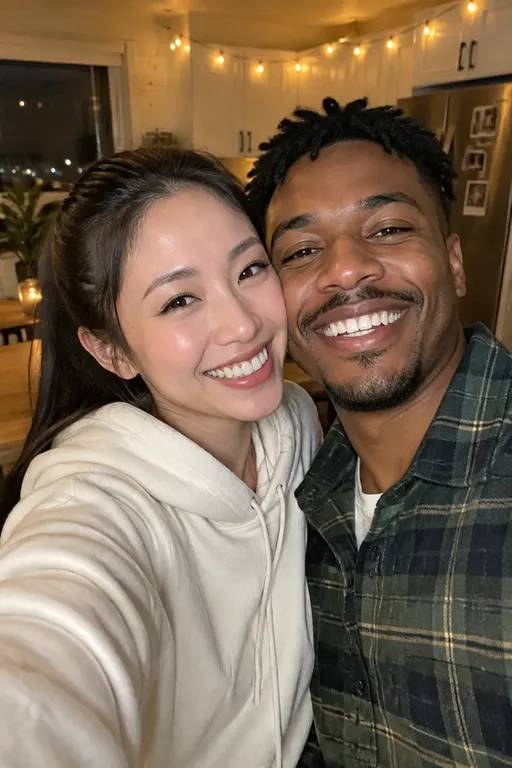
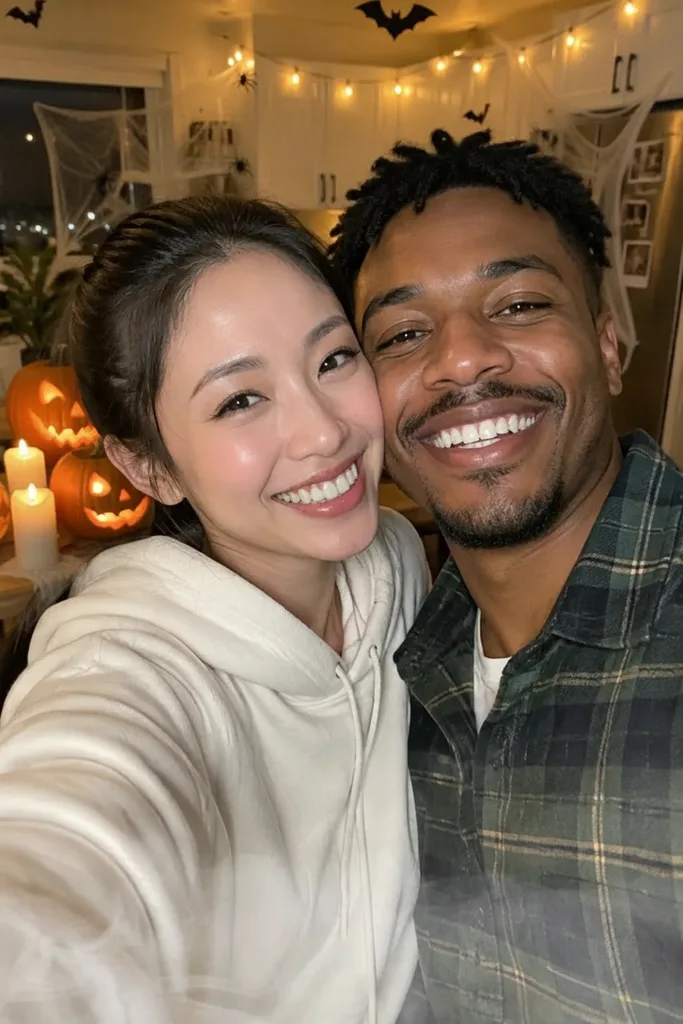
Original photo: couple taking a smiling selfie in a kitchen with string lights
Original
Smiling couple taking a selfie in a kitchen decorated with glowing carved pumpkins, candles, cobwebs and paper bats

Couple selfie · Room makeover

Haunted Kitchen

Carved pumpkins and candles on the counter, cobwebs over the cabinets, paper bats on the ceiling and a thin mist near the floor. The same kitchen, decorated for the night.

Both faces, the hoodie, the plaid shirt and even the string lights and fridge photos held. Our first run asked for low purple fog and got a heavy purple blob; thin pale mist worked.

Prompt

Edit the uploaded photo. Keep both people exactly as they are: same faces, expressions, hair, clothes, pose and camera angle. Change only the room into a haunted Halloween kitchen: carved jack-o'-lanterns glowing on the counter, cobwebs across the cabinets, dripping candles, a few paper bats on the ceiling and a thin layer of pale mist near the floor. Match the new candle light to the people so they look like they were really there. Photorealistic. Keep exactly two people. Avoid altered faces, text, logos and watermarks.
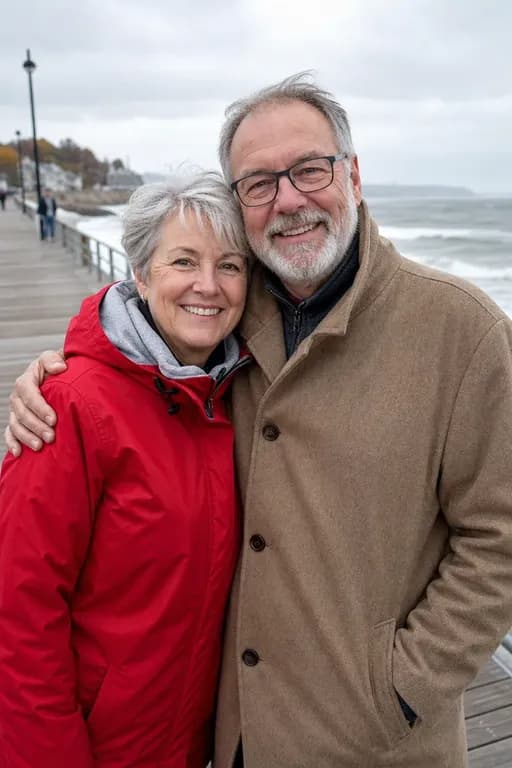
Original photo: older couple hugging on a seaside boardwalk on a grey day
Original
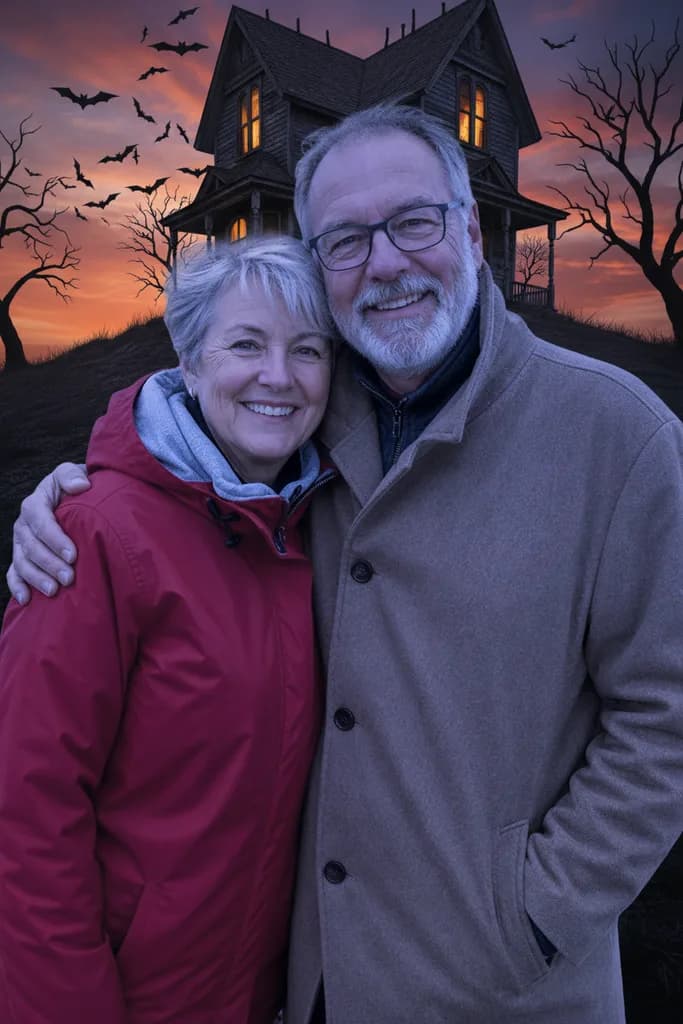
Older couple in a red jacket and a camel coat hugging in front of a crooked haunted house on a hill at dusk with bats

Couple · Background swap

Haunted House Hill

A crooked Victorian house on a hill at dusk, bare black trees, bats against an orange and violet sky and a few glowing windows behind the two of them.

Faces, glasses and the hug held well. The cool dusk light turned her red jacket a deeper crimson and his coat greyer, so drop the relight line if exact colors matter.

Prompt

Edit the uploaded photo. Keep both people exactly as they are: same faces, glasses, hair, coats, pose and camera angle. Replace only the background with a crooked Victorian haunted house on a hill at dusk, bare black trees, a flock of bats against an orange and violet sky and a few glowing windows. Relight the people with matching cool dusk light so the edit looks natural. Photorealistic. Keep exactly two people. Avoid altered faces, text, logos and watermarks.
Change the mood or add face paint, keep the scene

Nothing is added to the room: either the color and light turn eerie like a horror film filter, or only makeup goes on the face, so the moment still looks like yours.

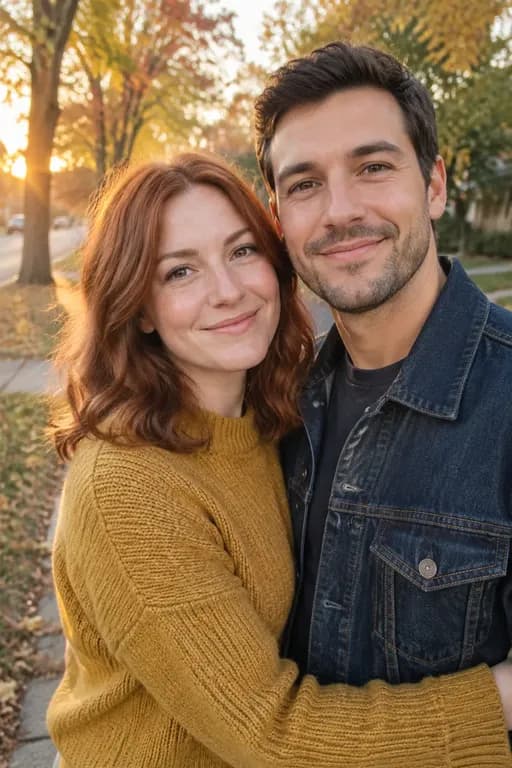
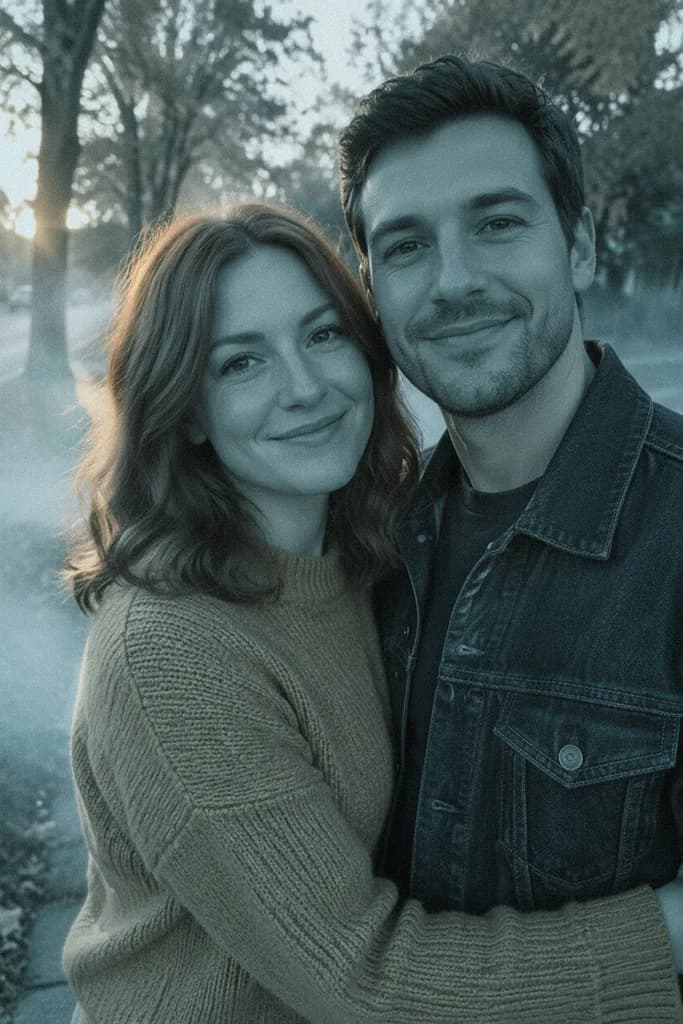
Original photo: couple hugging on an autumn street at sunset
Original
Couple hugging on a tree-lined street in cold teal horror film colors with fog drifting along the sidewalk

Couple · Mood filter

Horror Film Grade

A warm autumn sunset turned cold: teal shadows, a pale moonlit sky, low fog along the sidewalk, washed-out color and fine film grain.

Framing, trees and both faces stayed the same. The filter covers the whole frame, so her red hair went brown and the mustard sweater turned olive. Expect that from any strong grade.

Prompt

Edit the uploaded photo. Keep both people and the street exactly as they are: same faces, clothes, pose, framing and every object. Change only the mood: turn the warm sunset into an eerie horror-film look with cold teal shadows, a pale moonlit sky, low drifting fog along the sidewalk, desaturated color and fine film grain. Do not add or remove anything. Photorealistic. Keep exactly two people. Avoid altered faces, text, logos and watermarks.
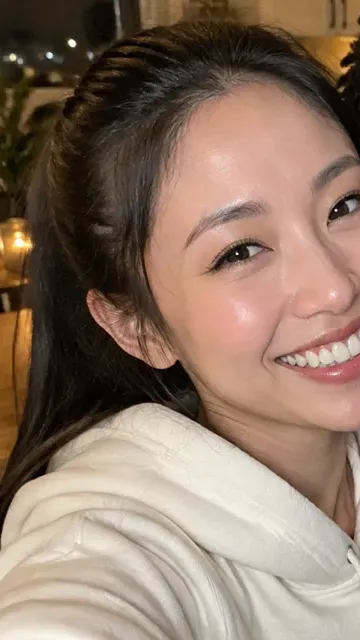
Original photo: smiling woman in a cream hoodie taking a selfie
Original
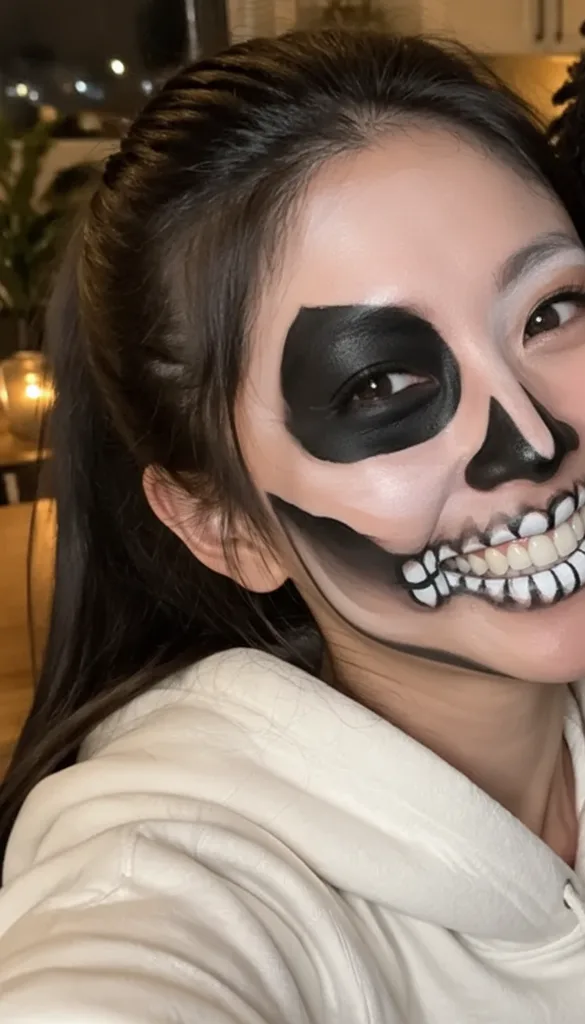
Close selfie of a smiling woman in a cream hoodie wearing black and white skeleton face paint with painted teeth

Selfie · Face paint

Half Skull Makeup

Matte black and white skeleton paint with a dark eye socket, a painted nose and teeth drawn over the lips, applied cleanly like a makeup artist would.

Hoodie, hair and kitchen held. The selfie shows mostly one side of her face, so the paint covered nearly all of it, and a trace of the person next to her in the original photo stayed at the right edge. Use a front-facing photo for a clean half split.

Prompt

Edit the uploaded photo. Keep the person, hair, hoodie, background, lighting and framing exactly as they are. Add only realistic Halloween face paint: a half-face skeleton design on the left side of her face in matte black and white, with painted teeth over the lips on that side, applied cleanly like a professional makeup artist would. Her skin texture and the unpainted half stay natural. Photorealistic. Keep one person. Avoid altered facial identity, gore, text, logos and watermarks.

Why use a Halloween photo editor instead of a costume swap

A costume tool changes what you wear, while a Halloween picture editor like this one works on everything around you. A Halloween photo editor keeps the outfit you really had on and changes the world around it, so the picture still feels like your night.

Keep the photo you already love

That kitchen selfie already has the right smiles. In the Halloween photo editor, change only the background or the mood and keep the faces, clothes and pose exactly as they were.

Edit couple photos in one go

Upload one photo of the two of you. Both people stay in place, and the haunted scene or filter covers the whole picture, so neither of you looks pasted in.

Test face paint before the party

See a skull or other painted design on your own face first. If it does not suit you, change the colors in the prompt instead of washing off real paint.

Input
One JPG, PNG or WebP photo, up to 10 MB
Price
8 credits per edit at 2K, 5 at 1K, 11 at 4K
Who fits
One person, a couple in one photo, or a pet
Access
Any subscription or credit pack
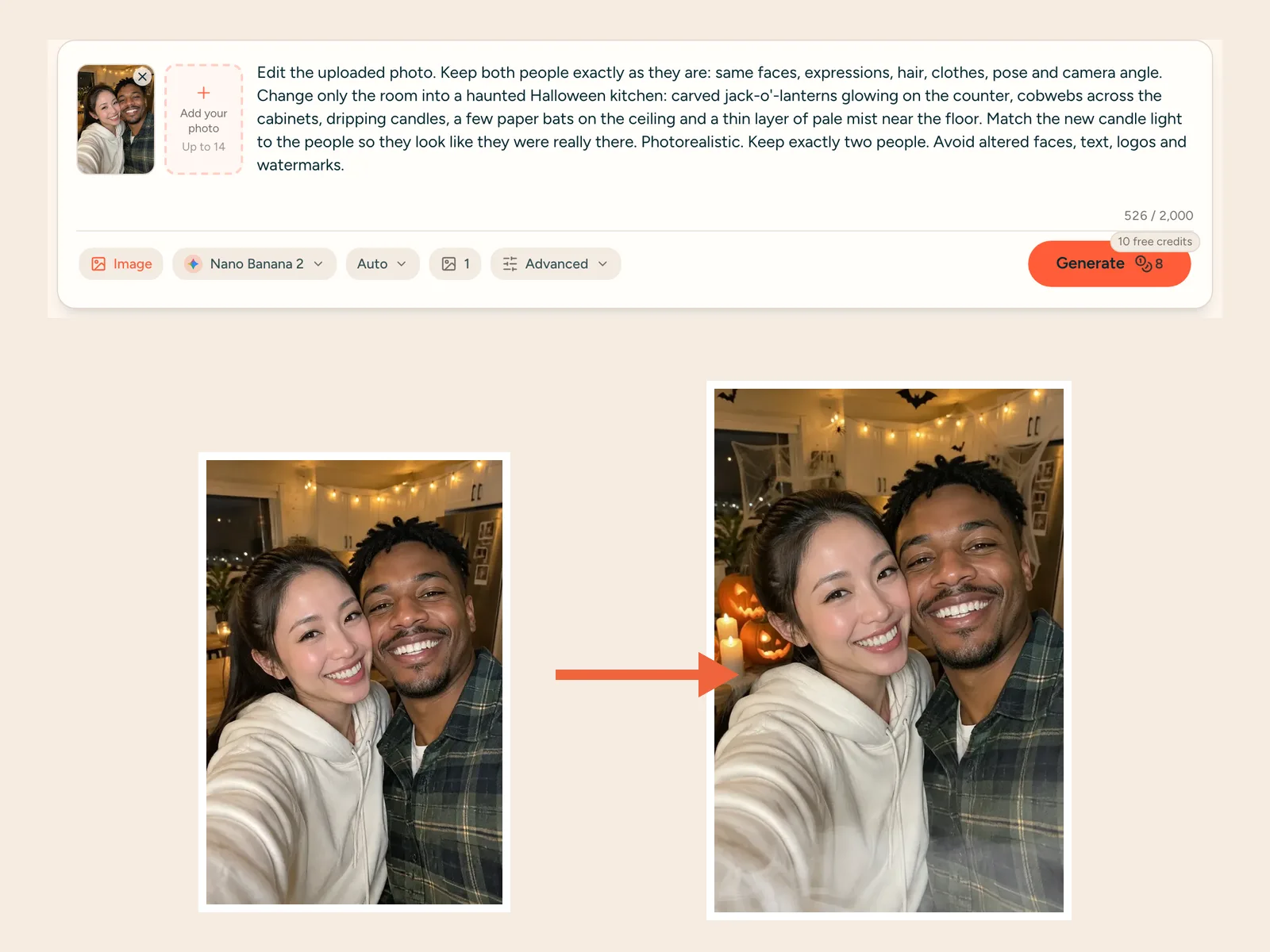
Monipix generator with a couple selfie uploaded and the Haunted Kitchen prompt loaded, next to the decorated kitchen result

How to edit a photo for Halloween with the Halloween photo editor

These are the steps we used in the Halloween photo editor for the four edits above. Nothing was retouched afterwards, and the notes on each card say what drifted.

More Halloween AI tools

One plan for upscaling and AI generation

Every plan upscales to 8K & 16K. Paid plans add far more credits and every image and video model.

Starter

$16.58/month
Billed $199 annuallySave 2 months
Unlimited image upscaling, free for 1 month (web + Canva app)Your credits go to AI image & video generation instead.
7,200 credits for the year, granted upfront
  • Every image & video model, full video renders
  • Use credits anytime — no monthly cap
  • Email support
Most Popular

Professional

$33.25/month
Billed $399 annuallySave 2 months
Unlimited image upscaling, free for 3 months (web + Canva app)Your credits go to AI image & video generation instead.
21,600 credits for the year, granted upfront
  • Every image & video model, full video renders
  • Use credits anytime — no monthly cap
  • Priority support

Premium

$58.25/month
Billed $699 annuallySave 2 months
Unlimited image upscaling, free for 6 months (web + Canva app)Your credits go to AI image & video generation instead.
43,200 credits for the year, granted upfront
  • Every image & video model, full video renders
  • Use credits anytime — no monthly cap
  • Priority support
Cancel anytimeSecure checkout via Stripe or PayPalCredit packs never expire

View full pricing and credit packs →

Halloween photo editor questions

How do I make my photo look spooky for Halloween?

Upload the photo to the box at the top of this page, press Use this look on one of the four cards or write your own edit, and press Generate. The Halloween photo editor keeps the people and changes the background, the light or the makeup you describe.

Is there a free Halloween photo editor?

Not here, and we would rather say so up front. Editing pictures needs a subscription or a one-time credit pack; the free monthly credits cover photo upscaling only. Each edit costs 8 credits at the default 2K size, 5 at 1K or 11 at 4K. Failed edits are refunded automatically.

How do I change the background without changing the people?

Write the keep part first: same faces, hair, clothes, pose and camera angle, and keep exactly two people if there are two. Then write change only the background and describe the new place. Our haunted house and kitchen edits both used this pattern.

Is there a Halloween photo filter that keeps everything else?

Yes, ask for a mood change and add do not add or remove anything, as in the Horror Film Grade card. A strong filter recolors the whole frame, so hair and clothes shift with it. Ask for a lighter grade if you want to keep their colors closer.

Can I edit a couple or group photo for Halloween?

A couple in one photo works well; three of our four tests are couples and every face held. Say how many people to keep and refer to them clearly, such as the person on the left. Larger groups are harder, so check every face before you share.

Can I add Halloween makeup to a photo?

Yes. Tell the Halloween photo editor to add face paint only and keep the hair, clothes and room the same, like the Half Skull Makeup card. A front-facing photo gives the cleanest result, because the design needs both sides of the face to land where you asked.

Which AI does the Halloween photo editor use?

The box starts on Nano Banana 2, Google's image editor, and you can switch to Nano Banana Pro, GPT Image 2 or Seedream in the same box. Our examples were made with the earlier Nano Banana, so results from this spooky photo editor can differ a little from the cards.

What happens to the photos I upload?

Only upload photos of yourself or of adults who agreed to it, never of children. Your photos and results are not sold; they go to the service that makes the picture and stay in your history until you delete them. Every face on this page is fictional.

Halloween Photo Editor: Make Your Own Photo Spooky

This Halloween photo editor keeps your faces and your real clothes, and changes only the scene, the light or the makeup. Upload one photo up to 10 MB.